
English 
Views: 0 Author: Site Editor Publish Time: 2026-10-08 Origin: Site


In industrial automation, display failure quickly translates to catastrophic equipment downtime. Specifying a reliable screen requires you to move far beyond basic resolution numbers. You must carefully evaluate environmental resilience, interface compatibility, and long-term supply chain stability. Commercial-grade screens heavily prioritize aesthetic appeal and slim profiles. However, an industrial LCD module must prioritize readability under the most brutal environmental conditions. It demands predictable controller behavior and robust resistance to electrical noise.
This article provides engineering and procurement teams with a definitive technical framework. We will help you thoroughly evaluate, prototype, and source the exact display you need. You will discover how to properly match screen specifications to control panels, programmable logic controllers (PLCs), and remote field instruments. Designing machinery for rugged environments presents unique challenges. Your interface panels often endure constant mechanical vibration and severe temperature swings. By mastering the core technical parameters outlined below, you can ensure flawless 24/7 operation and prevent unexpected field failures.
Operating temperature ranges and polarizer types (transflective vs. reflective) dictate readability in factory and outdoor environments.
Interface selection (SPI, I2C, or Parallel) fundamentally impacts microcontroller pin availability and refresh rates.
Reliable implementation requires vetting the controller IC ecosystem and anticipating common contrast (V0 pin) issues during prototyping.
Evaluating a graphic LCD manufacturer hinges on their End-of-Life (EOL) policies and customization capabilities for FPC lengths or backlights.
The gap between commercial and industrial displays is massive. Consumer displays fail rapidly when deployed in automated manufacturing setups. They simply cannot handle the extreme heat or heavy electromagnetic interference (EMI) found near high-voltage machinery. A standard consumer screen quickly degrades when exposed to continuous vibration. Heat causes the liquid crystals to lose their twisted structure, resulting in a washed-out screen.
To achieve a successful industrial deployment, we must establish strict success criteria. First, the display needs to support continuous 24/7 operation without suffering from image retention or ghosting. Second, it must maintain consistent contrast across years of active use. Finally, it requires zero-defect integration with your existing HMI and PLC hardware architectures. You need a display you can install and then completely forget about.
Why do engineers consistently rely on the 128x64 resolution? It remains the undisputed industry standard for monochrome status readouts. A 128x64 graphic LCD offers the perfect technical balance. It provides 8,192 distinct pixels. This yields sufficient data density for rendering text menus, error codes, and simple trend graphs. Simultaneously, it maintains a very low memory footprint. This prevents the display from overwhelming the processing overhead of a small host microcontroller.
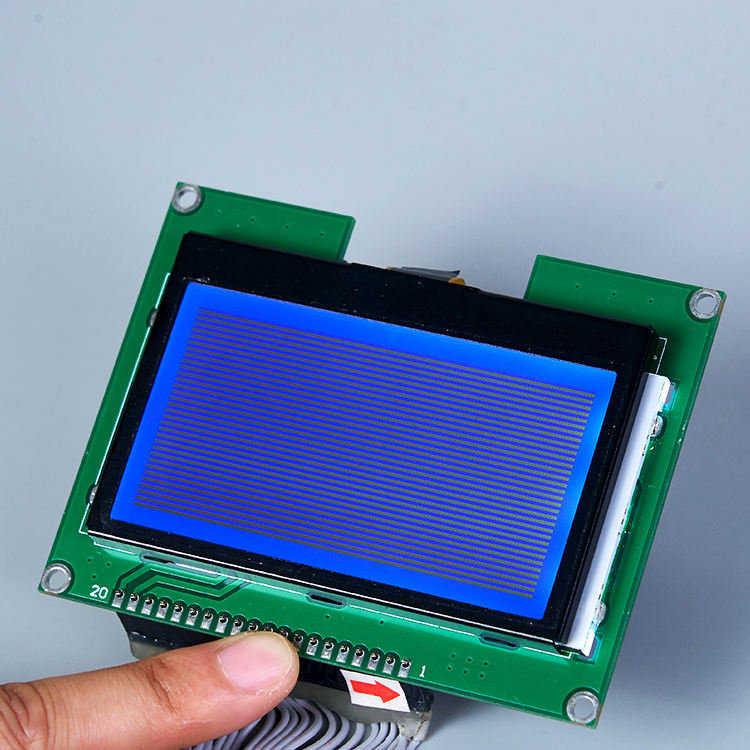
Operating temperatures will immediately dictate your fluid choice. Standard display fluids literally freeze or become incredibly sluggish below room temperature. You must define your standard versus wide temperature thresholds early in the design process. An operating range of -20°C to +70°C is strictly non-negotiable for unconditioned factory environments. For outdoor or extreme climates, you often need extended ranges stretching from -30°C to +80°C. High temperatures push the fluid toward its clearing point, turning the screen entirely black if poorly specified.
Next, consider sunlight readability. Your choice of optical polarizer directly impacts outdoor and indoor visibility.
Reflective: Best suited for outdoor, high-ambient light environments. It utilizes ambient light to illuminate the pixels. This offers the absolute lowest power consumption because it requires no backlight.
Transmissive: Requires a strong, continuous backlight to be visible. It works best for dark, indoor factory floors where ambient light is minimal.
Transflective: This represents the balanced choice. It combines both reflective and transmissive properties. It adapts seamlessly to variable lighting conditions typical in complex industrial control equipment.
We also need to evaluate physical durability. You must map the display enclosure requirements to your outer hardware's IP ratings. Devices rated IP65 or IP67 keep conductive dust and water away from the fragile glass edges. Furthermore, you should discuss vibration resistance thoroughly. Robust bezel frames and secure mounting designs prevent mechanical stress from shattering the screen. Integrating a rugged graphic LCD display ensures your data remains visible even on vibrating pump stations.
Hardware engineers must weigh data interface trade-offs very carefully. Your interface choice directly affects screen refresh rates and PCB routing complexity.
Parallel (8-bit): This interface delivers extremely high speed and fast refresh rates. It handles rapid screen updates effortlessly. However, it consumes a large number of MCU pins. This complicates PCB routing and demands a larger microcontroller package.
SPI / I2C: These serial interfaces use a dramatically lower pin count. They offer much easier PCB routing. This makes them ideal for space-constrained or low-power field devices. The main trade-off is a slightly reduced data throughput, which can cause lag during full-screen animations.
You must ensure controller IC stability. Always evaluate industry-standard controllers such as the ST7920, KS0108, or ST7565. Choosing a well-documented IC minimizes your firmware development time significantly. For example, selecting a chip with widespread open-source library support, such as U8g2, saves weeks of custom coding. Standardized drivers guarantee predictable behavior across different hardware revisions.
Logic voltage also matters immensely during hardware design. You should actively match the display logic (3.3V versus 5V) to your host industrial MCU. Older PLC architectures often use 5V logic. Modern ARM Cortex processors use 3.3V logic. Matching voltages helps you avoid using external logic level shifters. This directly reduces your Bill of Materials (BOM) complexity and minimizes potential points of failure.
Your specific industrial application dictates the liquid crystal fluid technology you must select. We generally choose between STN and FSTN fluids when specifying a monochrome graphic LCD. Both offer distinct optical and functional advantages.
STN (Super-Twisted Nematic) remains highly cost-effective and widely available. It is perfectly suitable for basic industrial readouts where color accuracy is not critical. You will typically see a noticeable yellow/green or blue color tint in the background. This tint works perfectly fine for simple status indicators and basic numerical readouts.
FSTN (Film-Compensated STN) adds a specialized retardation film. This offers a much higher contrast ratio. It neutralizes the color tint to provide a true black-and-white appearance. Furthermore, it delivers much wider viewing angles. We strongly recommend FSTN technology for premium control panels requiring high legibility from oblique angles.
Technology Type | Visual Appearance | Contrast Ratio | Viewing Angle | Best Application Scenario |
|---|---|---|---|---|
STN (Super-Twisted Nematic) | Yellow, Green, or Blue tint | Moderate | Standard | Budget-friendly basic status readouts |
FSTN (Film-Compensated STN) | True Black and White | High | Wide | Premium control panels, complex graphs |
Power consumption requires careful analysis during the engineering phase. You must measure the electrical current draw both with and without LED backlights active. This metric becomes critical for battery-powered automated sensors. Without a backlight, a reflective 128x64 LCD module sips mere microamps. Activating the backlight can instantly increase consumption by 20 to 100 milliamps, draining small batteries quickly.
Prototyping embedded hardware often reveals unexpected bugs. The contrast adjustment pin (commonly labeled as the V0 pin) causes the most frequent hardware failure. Engineers frequently wire this pin incorrectly on their breadboards. Sometimes they omit the required contrast potentiometer completely. A missing or incorrectly valued resistor network leaves the screen completely blank or entirely dark. This easily tricks developers into assuming they received a defective display.
Memory constraints pose another significant architectural challenge. You must account for the strict RAM requirements before writing firmware. Frame buffering a 128x64 display consumes exactly 1,024 bytes (1KB) of RAM. This seemingly small amount easily exhausts the available memory on legacy 8-bit microcontrollers. If RAM is limited, you must utilize page addressing modes instead of a full graphical frame buffer.
Finally, you must aggressively address Electromagnetic Interference (EMI). Noisy industrial environments constantly disrupt fragile data signals. Large motors and relays generate massive voltage spikes. You can mitigate these issues through proper PCB grounding techniques. Always shield the ribbon cable when routing it near high-voltage lines inside the enclosure. Additionally, place 0.1uF decoupling capacitors as close to the display's power pins as physically possible to smooth out voltage ripples.
Sourcing an industrial screen is a serious long-term commitment. Supply chain longevity matters just as much as technical specifications. You need a trusted graphic LCD manufacturer that offers an explicit End-of-Life (EOL) policy. Guaranteed product availability for 5 to 10 years is critical. Industrial equipment life cycles far outlast consumer electronics. You cannot afford to redesign your enclosure every two years because a screen became obsolete.
You should also assess their engineering customization capabilities. Can they supply a custom graphic LCD without charging exorbitant Non-Recurring Engineering (NRE) costs? Minor tweaks often solve major mechanical headaches. Look for the ability to easily modify FPC (Flexible Printed Circuit) lengths to reach your mainboard. Ask if they can adjust LED backlight colors to match your corporate branding. Verify if they can seamlessly bond custom resistive or capacitive touch panels directly to the cover glass.
Quality assurance separates reliable manufacturing partners from poor ones. You must verify their rigorous outgoing quality control (OQC) standards. Ask them to provide detailed thermal and vibration testing reports for the exact module you intend to buy. Furthermore, ensure they utilize ISO-certified manufacturing processes. Strict adherence to ISO 9001 guarantees consistent batch-to-batch reliability, preventing sudden defect spikes during mass production.
Choosing the right 128x64 display is fundamentally an exercise in risk mitigation. You must carefully balance environmental ruggedness with hardware integration simplicity. A well-specified display prevents costly field failures, reduces engineering headaches, and significantly enhances user interaction. Do not treat the screen as an afterthought in your hardware design process.
Follow these action-oriented next steps to ensure project success:
Request full, unredacted datasheets from your supplier to confirm exact optical and electrical parameters.
Verify the display controller IC compatibility against your current embedded software stack.
Order multiple development samples very early in the hardware design phase.
Perform extreme-temperature and vibration bench testing before finalizing your production BOM.
A: Character LCDs have fixed ROM-based fonts. They are strictly limited to displaying text within predefined block grids. Graphic LCDs map individual pixels freely across the entire screen. This allows for custom UI elements, complex graphs, custom logos, and varied font sizes simultaneously.
A: This typically points to an uncalibrated contrast pin (V0). It usually requires a 10k potentiometer to set the correct voltage. It can also result from an incorrect logic voltage or a mismatched initialization sequence in your microcontroller firmware.
A: Standard fluids freeze or become extremely sluggish below 0°C. Industrial-grade modules use specialized wide-temperature fluids. These are officially rated for -20°C or lower. This maintains acceptable screen response times and prevents permanent crystal damage.
A: Yes, it works exceptionally well for simple status updates and basic text menus. However, high-framerate animations or rapid data logging screens require higher bandwidth. For fluid animations, use SPI or parallel interfaces to prevent visual lagging.


